
How to Choose a WordPress Plugin License Manager for Your Business
Written by Towhid Islam. Posted in WooCommerce, WordPress 1 Comment
If you build and sell WordPress plugins or themes outside of a marketplace, at some point you run into the same question: how do you control who can use your product, for how long, and on how many sites? Selling a download is easy. Controlling what happens after the download is not. This is the exact problem a WordPress plugin license manager is built to solve.
This guide walks through what a plugin licensing system actually does, why developers and agencies end up needing a software license manager for WordPress, what to check before choosing a WordPress plugin license manager, and how to set one up using Elite Licenser as a working example.
What Is a WordPress Plugin License Manager?
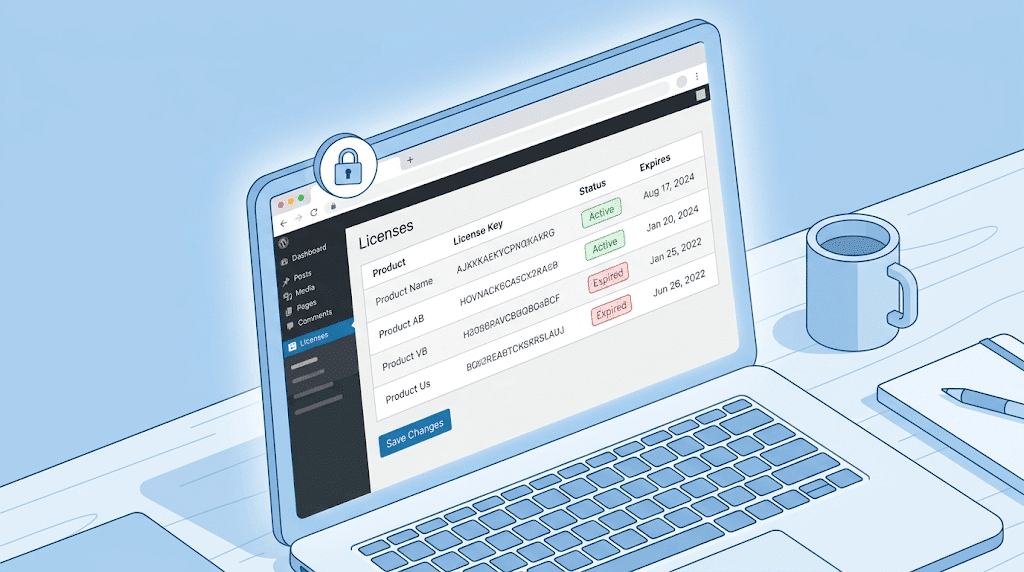
A WordPress plugin license manager is a plugin or application that generates, issues, tracks, and validates license keys for software you sell — typically WordPress plugins and themes, but also PHP scripts, .NET applications, and mobile apps. When a customer buys your product, the license manager creates a unique key tied to their order. That key controls how many websites can activate the product, whether the customer receives automatic updates, and whether support is still active.
This is different from selling through a marketplace like Envato/CodeCanyon, where the marketplace itself issues a purchase code and handles licensing on your behalf. If you sell directly from your own website — through WooCommerce, Easy Digital Downloads (EDD), or a custom checkout — you need your own licensing system, because there is no marketplace doing it for you.
A dedicated WordPress license manager plugin runs on your own WordPress install, gives you a dashboard to manage products and license types, and usually exposes an API so your plugin or theme can “call home” and check whether a given license is valid. In practice, this kind of software license manager for WordPress is really just a license key management system that happens to live inside wp-admin instead of a separate external dashboard.
Why Independent Developers and Agencies Need a Plugin Licensing System
The Piracy Problem
Without any licensing check in place, nothing stops a single customer from sharing your plugin’s zip file, or a “nulled” copy showing up on a piracy site. A WordPress plugin license manager does not make piracy impossible, but it gives you a way to detect it, cap the number of active domains per license, and revoke a key once misuse is confirmed. If piracy is a concern for your product line, it’s worth reading through a dedicated breakdown of how to protect a WordPress plugin from piracy alongside this guide.
Update and Support Control
Plugin and theme buyers expect updates. But updates should generally go to customers with an active license or an active support period, not to everyone who ever downloaded the file. A software licensing plugin lets you tie update delivery to license status, so lapsed customers stop receiving new versions until they renew.
Customer and License Tracking
Once you have more than a handful of customers, spreadsheets stop working. A license key management system gives you one dashboard showing every product, every customer, every license type, and every domain a license is active on — along with expiration dates for renewals.
Selling Through WooCommerce or EDD
If your store runs on WooCommerce or Easy Digital Downloads, a WordPress plugin license manager that connects directly to those checkouts can generate and email a license key automatically the moment an order is placed, and deactivate it automatically if the order is refunded or cancelled. This is one of the more practical uses of license key management, since it removes the manual step of creating and emailing a key for every single order.
How a WordPress License Manager Plugin Works Behind the Scenes
The mechanics are fairly consistent across most WordPress plugin license manager tools:
- A product is created inside the license manager, along with a license type (for example: single-site, multi-site, or a one-year term).
- When a customer buys the product, a license key is generated — either manually by the seller or automatically through a store integration.
- The customer enters that key inside the plugin or theme they installed on their own website.
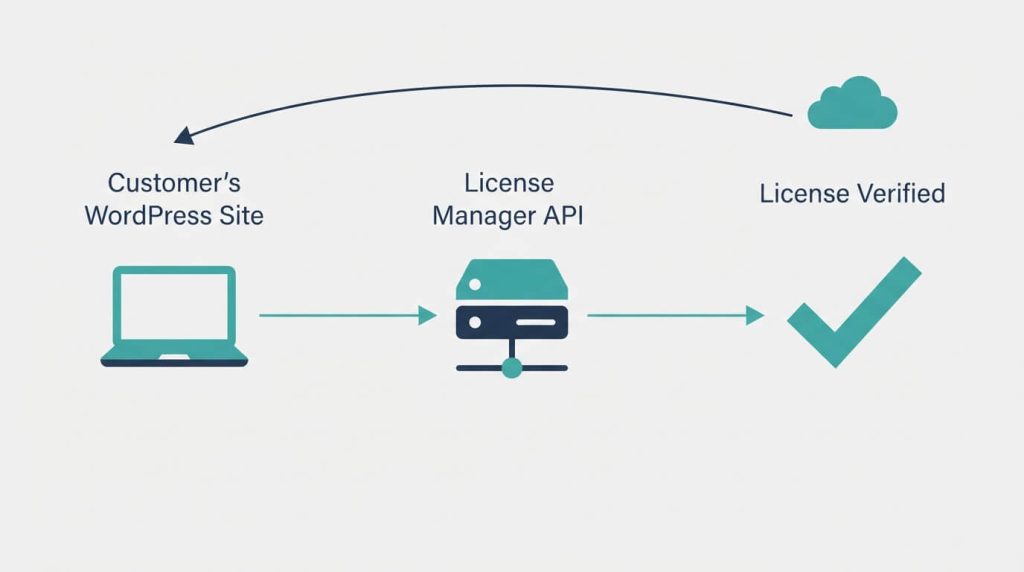
- The plugin makes an API request back to the license manager to confirm the key is valid and has not exceeded its domain limit.
- If valid, the site is marked as “activated” against that license. If the customer tries to activate the same key on more sites than allowed, the request is rejected.
- The license manager can then push update notifications back to activated sites when a new version is released, the same way a plugin listed on WordPress.org receives updates.
This request-and-response pattern is what makes domain restriction and auto host banning possible — the server-side system, not the plugin code alone, decides whether an install is authorized. Anyone building or evaluating a system like this should look for the underlying API documentation, since that’s what shows exactly how activation checks are handled.
Build vs. Buy: Comparing Your Licensing Options
Before picking a specific WordPress plugin license manager, it helps to compare the three broad paths developers take.
| Approach | Development effort | Ongoing maintenance | WordPress update integration | Typical cost |
|---|---|---|---|---|
| Build a custom licensing system from scratch. | High—requires backend development and a secure API | You maintain and patch it yourself. | Manual, needs custom code | Developer time only, but ongoing |
| Use a general-purpose license. SaaS (not WordPress-specific) | Medium—needs custom integration work | The vendor maintains the core service. | Usually needs custom glue code | Recurring subscription |
| Use a dedicated WordPress plugin license manager. | Low—install and configure | Plugin updates handle most maintenance. | Built for WordPress-style updates | One-time or annual license fee |
For most plugin and theme sellers, a purpose-built WordPress license manager plugin is the practical middle ground: it avoids the cost of building a licensing backend from zero, while staying native to the WordPress admin and update system that customers already understand.
What to Look for When Choosing a WordPress Plugin License Manager
Not every WordPress plugin license manager covers the same ground, and not every software licensing plugin is built with the same type of seller in mind. Before choosing one, check it against these points.
1. License key generation and license key management. You should be able to create different license types — single-domain, multi-domain, or time-limited (for example, a one-year license) — rather than being locked into one rigid format.
2. Domain or site activation limits. Each license type needs a configurable maximum number of domains, so a single-site license can’t quietly be reused across ten installs.
3. Automatic product update delivery. Once a customer’s license is valid, they should get plugin or theme updates that appear the same way core WordPress or WordPress.org plugin updates do, without a separate manual download step.
4. WooCommerce or Easy Digital Downloads integration. If you sell through your own store, look for an add-on that auto-generates a license the moment an order is completed, and automatically deactivates it if the order is refunded, cancelled, or fails.
5. Marketplace and payment gateway integration. If you also sell on Envato/CodeCanyon, a licensing system with built-in Envato purchase-code verification saves you from running two separate systems. Support for payment gateways such as Paddle or FastSpring is useful if you sell licenses directly outside WooCommerce/EDD.
6. API access for non-WordPress products. If you also license PHP scripts, C#/.NET applications, or Android apps, you need a software license manager with API support and ideally sample integration code, not just a WordPress-only workflow.
7. Piracy safeguards. Look for URL-based restriction (so a license tied to example.com can’t quietly also run on example.com/app2) and automatic host banning after repeated failed activation attempts.
8. Customer self-service. A member area where customers can see their own licenses, renew, or manage activations reduces the number of manual support tickets you handle.
9. Reporting and data export. Being able to export your license and client list as CSV matters if you ever need to move data into a CRM or run your own analysis outside the plugin.
Elite Licenser as a WordPress Plugin License Manager
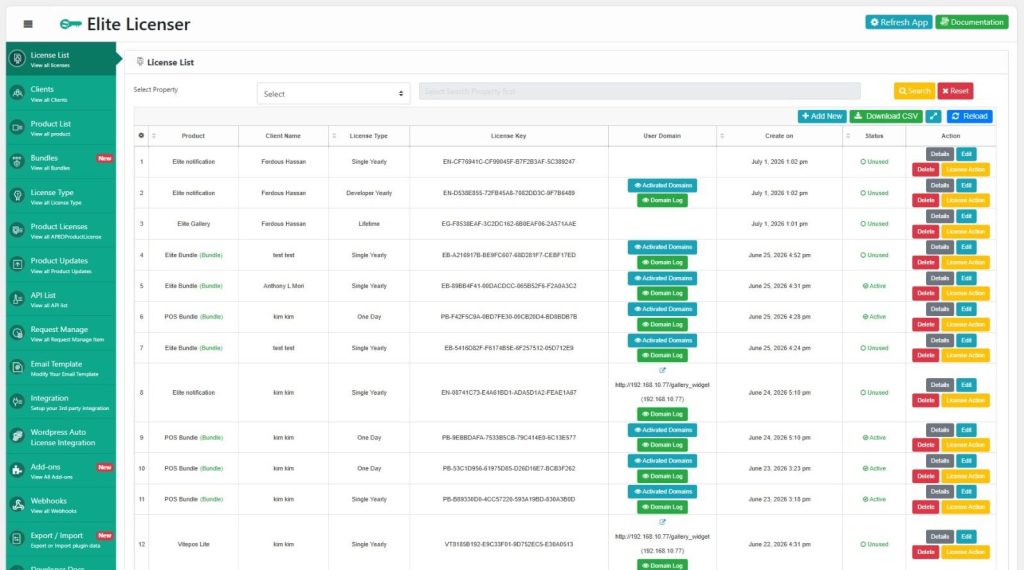
Elite Licenser is a WordPress plugin license manager and software license manager for WordPress built by AppsBD for developers and agencies selling plugins, themes, and other software products. It runs from a single dashboard where products, license types, and customer licenses are created and tracked in one place, which covers most of the criteria listed above.
On the features page, the core functionality includes automatic license generation on purchase, manual or automatic license delivery, license tracking (including number of activated domains and expiration status), and a product update module that lets you upload a new plugin or theme version so activated sites receive it as a standard update. It also generates sample integration code for PHP, C#.NET, and VB.NET applications, which is useful if you license products outside of WordPress itself.
For piracy protection specifically, Elite Licenser includes URL-based restriction and an auto host ban option that blocks a domain automatically after repeated failed activation attempts using an incorrect key. It also supports webhooks, so a third-party application — such as a membership plugin — can be notified the moment a new client or license is added.
Store and marketplace integrations. Elite Licenser includes built-in Envato purchase-code verification, so customers who bought through CodeCanyon or ThemeForest don’t need a separate manually issued key. It also supports Paddle and FastSpring payment gateway integration for direct sales, documented under Envato and FastSpring in its documentation.
WooCommerce and EDD support. For sellers who need a WooCommerce license manager for digital products, the WooCommerce add-on auto-generates and manages license codes tied to WooCommerce orders — visible on the order screen, and deactivated automatically if an order is refunded, cancelled, or fails. There’s a comparable EDD add-on for sellers on Easy Digital Downloads.
Customer self-service. The Member Area add-on gives customers their own portal to view and manage licenses, which is particularly useful for sellers who also run coupon or deal-site promotions and want to reduce manual license lookups.
Pricing. Elite Licenser is priced by product limit and license term rather than a single flat fee — a Developer plan (limited product count) and an Agency plan (unlimited products), each available yearly or as a one-time lifetime purchase, with a stated 30-day money-back guarantee. Current pricing details are listed on the pricing page, since plans and promotional pricing change over time.
If you’re specifically looking for the best WordPress plugin license manager for developers rather than casual sellers, the checklist above is really a shorthand for “does this support the way developers actually ship and update code” — API access, sample integration code, and update delivery matter more to that audience than a simple key-generation form does.
Step-by-Step: Setting Up a WordPress Plugin License Manager
Once you’ve chosen a license manager, the setup sequence generally looks like this:
- Install and activate the plugin. Upload and activate the license manager on the WordPress site you’ll use as your licensing hub. Elite Licenser has a dedicated installation and activation guide if you want a reference walkthrough.
- Add your product. Register each plugin or theme you sell as a separate product inside the license manager. See the add product documentation for the exact fields involved.
- Create a license type. Define whether this is a single-domain license, a multi-domain license, or a time-limited license, and set the maximum number of activations. Reference the license type guide for the available options.
- Connect your checkout. If you sell through WooCommerce or EDD, install the matching add-on so licenses are generated automatically on purchase. If you sell on Envato, connect the Envato integration so purchase codes are recognized without manual key creation.
- Set up your update source. Add version details and the updated plugin or theme file inside the license manager so activated sites are notified the way they would be for a WordPress.org-hosted plugin.
- Enable API access if needed. If you’re licensing a non-WordPress application — a PHP script, a desktop app, or a mobile app — use the API documentation and generated sample code to wire up activation checks.
- Test on a staging site before going live. Activate a test license on a staging install, confirm the domain limit is enforced correctly, then confirm deactivation and renewal both work as expected.
Common Mistakes to Avoid
- Skipping the staging test. Testing licensing logic for the first time on a live customer’s site is how support tickets pile up in week one.
- Leaving domain limits too loose. A single-site license that doesn’t actually enforce a one-domain cap gives customers no reason to buy more than one license.
- No renewal or expiration reminder process. If customers aren’t reminded before a license lapses, updates quietly stop and they assume the product is broken rather than expired.
- Ignoring documentation for customers. If buyers don’t know where to enter a license key or how activation works, support volume goes up even when the licensing system itself works fine.
- Overcomplicating license types. Creating too many near-identical license tiers makes both your pricing page and your support process harder to manage than necessary.
Additional Tips
- Review your license activation report periodically rather than only when a customer complains — unusual activation patterns (many domains on one key) are often the first sign of a shared or leaked license.
- If you’re unsure whether piracy protection is worth the setup time, the practical answer is usually yes once you have paying customers, since a single leaked license key can spread quickly; see how to protect a WordPress plugin from piracy for a deeper look at that specific problem.
- If you’re still deciding whether to sell through a marketplace, your own store, or both, it’s worth reading a general overview of how to sell WordPress plugins and themes online before finalizing your licensing setup, since the sales channel affects which integrations you’ll actually need.
- For background on the licensing concept itself, what a license key is and how it works is a useful primer if you’re setting this up for the first time.
When You Might Need Professional or Technical Help
Most WordPress plugin license manager setups don’t require a developer if you’re only licensing standard WordPress plugins or themes sold through WooCommerce, EDD, or Envato — the add-ons handle the integration. You’re more likely to need developer support if you’re licensing a non-WordPress application (a standalone PHP system, a desktop app, or a mobile app) and need to write custom code against the license manager’s API, or if you’re migrating an existing customer base from one licensing system to another and need to preserve activation history without disrupting active installs.
FAQ
Envato’s purchase code system is built into the CodeCanyon/ThemeForest marketplace and only applies to items sold there. A standalone WordPress plugin license manager runs on your own site and lets you issue and control licenses for products sold anywhere, including your own store, while still optionally recognizing Envato purchase codes for marketplace sales.
Yes, if the license manager includes a WooCommerce integration or add-on. This typically generates a license key automatically when an order is placed, attaches it to the order, and deactivates the license if the order is refunded or cancelled.
For standard WordPress products sold through WooCommerce, EDD, or Envato, no — setup is done through the plugin’s admin settings. Coding is generally only needed if you’re integrating a non-WordPress application with the license manager’s API.
It doesn’t make piracy impossible, but it limits the damage: a license can be capped to a set number of domains, restricted to a specific URL, and automatically revoked or the offending host banned after repeated invalid activation attempts.
Many WordPress-based license managers, including Elite Licenser, provide an API and sample code for PHP, C#/.NET, and similar environments, so the same licensing system can also cover software that isn’t a WordPress plugin or theme.
A yearly plan typically includes one year of updates and support before renewal is required, while a lifetime plan is a one-time purchase that usually still limits ongoing support to a fixed period (commonly one year) even though update access continues. Always check the specific terms on the vendor’s pricing page, since this varies by provider.
Conclusion
Choosing the right WordPress plugin license manager comes down to matching the tool to how you actually sell your product, whether you think of it as a plugin licensing system, a software licensing plugin, or simply a license key management dashboard. If you sell through your own WooCommerce or EDD store, prioritize a system with a direct store integration. If you also sell on Envato, purchase-code verification saves duplicate work. If you license anything outside WordPress, API access and sample code matter more than any other feature on this list. Whichever plugin licensing system you choose, the underlying job is the same: issue keys, enforce domain limits, deliver updates to valid customers, and give you visibility into how your product is actually being used once it leaves your hands.
Subscribe
To get news about new releases, Updates, Blog Post, Deals and Discounts
[…] expiration dates, and control how many sites each license activates. This is where a dedicated WordPress plugin license manager becomes relevant, separate from the pricing decision […]