
How to Build a Customer License Area for a WordPress Plugin
Written by Towhid Islam. Posted in WordPress, Elite Licenser, WooCommerce 2 Comments
If you sell a WordPress plugin, a theme, or any licensed software product, your customers eventually need a place to check their license key, see when it expires, move it to a new domain, or download the latest version. Without a customer license portal, all of that ends up in your support inbox. With one, customers handle it themselves in a few clicks.
This guide explains what a customer license portal is, why plugin sellers need one, and how to set one up on a WordPress site using a dedicated license manager. It also covers how this connects to WooCommerce and Easy Digital Downloads (EDD), since most plugin businesses sell through one of the two.
What a Customer License Portal Actually Is
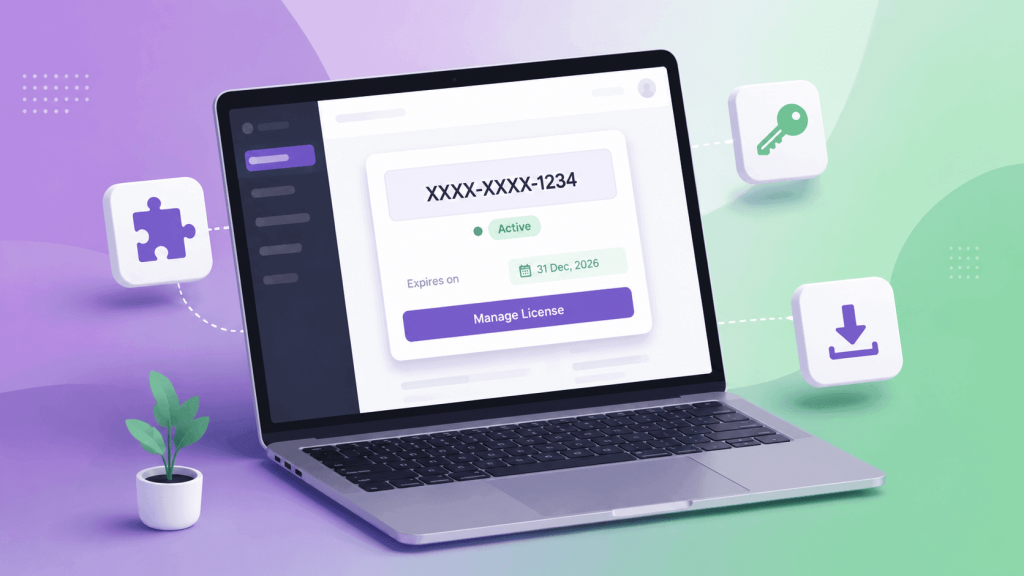
A customer license portal, sometimes called a license management dashboard or a customer license area, is a private, logged-in area of your website where a buyer can:
- View the license key or keys tied to their account
- See the license status, expiration date, and renewal date
- Activate or deactivate the license on a specific domain
- Move a license from one site to another (a domain reset)
- Download the current version of the plugin or theme
- Update account details, such as email or password
This is different from a general WordPress member area plugin built for courses or gated content. A license portal is built specifically around license keys, activation limits, and product updates, which are concepts a generic membership plugin does not handle well on its own.
Why Plugin Sellers End Up Needing One
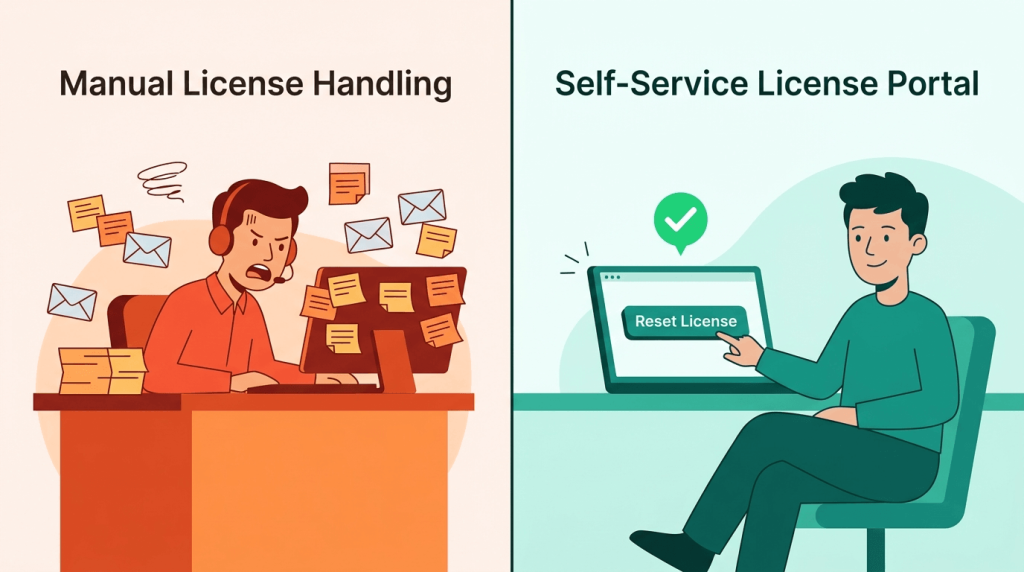
When you first launch a plugin, license handling is usually manual. You generate a key by hand, email it to the buyer, and answer questions one at a time. This works fine for the first handful of sales.
The problem shows up as sales grow. A few patterns repeat across plugin businesses:
- Support tickets pile up around license questions. “Where is my license key?” and “How do I move my license to a new site?” become two of the most common tickets.
- Refund and cancellation cleanup is manual. Someone has to remember to deactivate a license after a refund, or it keeps working indefinitely.
- Domain changes are treated as one-off requests. A customer who rebuilds their site on a new domain has to email support and wait, instead of resetting the license themselves.
- There is no single source of truth for the customer. The buyer does not know whether their license is active, expired, or already used on another site, so they ask instead of checking.
- Update delivery is inconsistent. Without a connected system, sending updated plugin files to every active customer becomes its own project.
None of these problems are caused by having too many customers. They are caused by the absence of a self-service system. A self-service license portal does not remove license management — it moves the routine parts of it away from your inbox and into an interface the customer controls.
What Causes These Problems in the First Place
It helps to be specific about why manual license handling breaks down, since the cause determines the right fix.
- License data lives in spreadsheets or order notes, not in a structured system the customer can query. There is nothing for a customer to log into, so every question becomes a support message.
- Activation is not tied to a domain check. Without a domain-based restriction, one license key can be reused across many sites, and there is no clean way for a legitimate customer to reset their own activation.
- There is no automatic link between the order and the license. If license generation is a manual step after a sale, delays and mistakes are inevitable, especially during a sale or launch when order volume spikes.
- Product updates are pushed through email or a download page instead of the WordPress update mechanism, so customers do not get notified inside their own WordPress dashboard.
Each of these is solvable with the same underlying fix: connect the purchase, the license key, the activation record, and the customer’s account into one system, and expose the relevant parts of that system to the customer through a portal.
Core Features a Customer License Area Needs
Before building or choosing a solution, it is worth defining what “good enough” looks like. A functional customer license portal should include:
| Feature | Why it matters |
|---|---|
| Secure login for registered customers | Keeps license data private and tied to the right account |
| License key display with status (active, expired, revoked) | Removes the most common support question outright |
| Self-service activation and deactivation | Lets customers move a license to a new domain without asking |
| Expiration and renewal information | Reduces confusion around lapsed licenses |
| Product update delivery | Lets the plugin check for and receive updates like a normal WordPress plugin |
| Account and password management | Basic expectation for any logged-in area |
| Admin-side visibility into all licenses | Lets you audit, revoke, or extend licenses without digging through order history |
A system that only covers the admin side (generating and listing license keys) but has no logged-in area for the customer is a license manager, not a license portal. The portal is the customer-facing half.
It is worth noting that a customer license portal does not need to be complicated to be effective. Most of what a buyer wants from it fits on a single screen: their key, its status, and one or two buttons to act on it. Businesses that overbuild this screen with unrelated account features often see lower adoption, because customers cannot quickly find the license action they came for.
Do You Build It Yourself or Use a Ready-Made Plugin?
There are two realistic paths for adding a customer license area to a WordPress-based product business.
Building It Yourself
This means writing custom code to generate license keys, store them against orders, build a login-protected page, and handle activation requests through a REST endpoint or AJAX calls. It is possible, and some larger plugin companies do maintain custom systems.
The tradeoffs:
- Full control over the exact data model and workflow
- No recurring cost for a third-party license tool
- Significant development time upfront
- Ongoing maintenance as WordPress, WooCommerce, or EDD update their APIs
- Security considerations (key generation, rate limiting, domain validation) fall entirely on you
Using a Dedicated License Manager Plugin
This means installing a plugin built specifically for software license management, which typically already includes license generation, an admin panel, a customer-facing area, and integrations with WooCommerce or EDD.
The tradeoffs:
- Faster setup, often a day or two instead of weeks
- Tested activation and domain-restriction logic
- Built-in customer login area, so there is no separate membership plugin to configure
- Less flexibility for highly unusual licensing models
- Some dependency on the plugin’s own update cycle
For most plugin, theme, and small SaaS sellers on WordPress, a dedicated license manager is the more practical route, because license generation, activation limits, and update delivery are solved problems that do not need to be rebuilt from scratch for each new product.
Step-by-Step: Building a Customer License Area with Elite Licenser
Elite Licenser is a WordPress plugin built to manage software licensing for plugins, themes, and other applications, including a dedicated customer-facing area for license management. Here is how the setup generally works.
Step 1: Install and Configure the Core License Manager
Install the Elite Licenser plugin and set up your product list, license types, and API settings from the WordPress admin panel. This is where license generation rules, such as activation limits per key, get defined. The features page covers what the core plugin handles before any add-on is installed.
Step 2: Add the Member Area Add-on
The customer-facing side comes from the Member Area add-on. This is the part that turns a back-end license manager into an actual customer license portal. Once activated, it gives registered customers a private dashboard where they can:
- View their generated license keys and status
- Reset or remove a license from one domain so it can be applied to another
- See product details, including available downloads and version notes
- Manage basic account and password settings
The add-on also includes a coupon management module, which is separate from licensing but useful if you run promotions through deal platforms like AppSumo or similar sites.
Step 3: Set Up the Login and Registration Flow
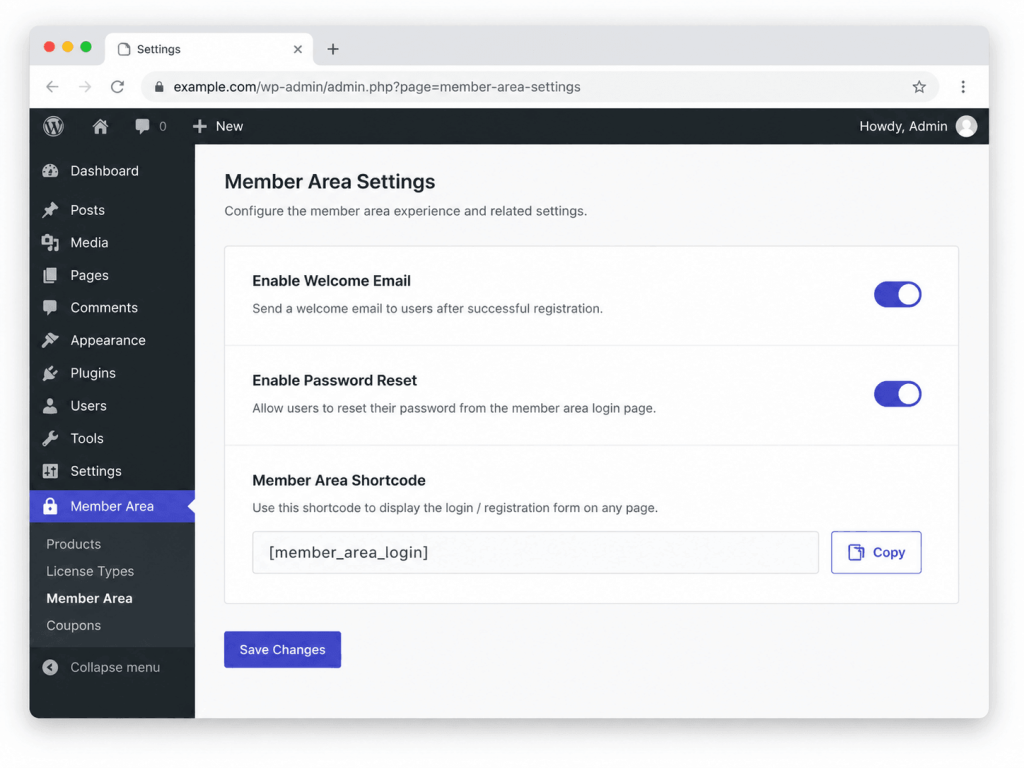
Use the built-in shortcodes to place the member area and registration forms on a page of your choice. You can customize the “thank you” message shown after purchase, the welcome email, and the password-reset email template so the whole flow matches your product’s branding rather than looking like a generic plugin screen.
Step 4: Connect It to Your Sales Channel
If products are sold through WooCommerce or EDD, install the matching add-on so a license key is generated automatically the moment an order completes, rather than requiring a manual step. This is covered in more detail in the next section.
Step 5: Test the Full Customer Journey
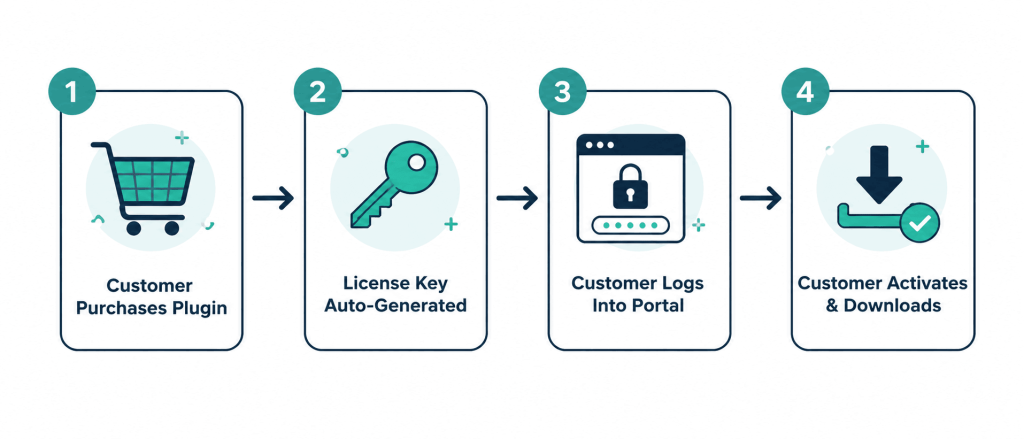
Before going live, walk through it as a customer would: make a test purchase, receive the license key, log into the member area, activate the license on a test domain, then deactivate and reactivate it on a second domain. This surfaces most configuration issues (wrong redirect links, missing email templates, incorrect activation limits) before real customers hit them.
Connecting the Portal to WooCommerce and Easy Digital Downloads
Most plugin and theme sellers run their store on either WooCommerce or Easy Digital Downloads, so the license portal needs to plug into whichever one is in use.
WooCommerce: the WooCommerce add-on automatically generates and manages license codes tied to WooCommerce orders. The license appears on the order itself, and it is automatically deactivated if the order is refunded, canceled, or fails. This keeps license status in sync with payment status without manual cleanup, which is one of the more error-prone parts of manual license handling.
Easy Digital Downloads (EDD): the corresponding EDD add-on works the same way for stores built on Easy Digital Downloads. A license is generated and attached to the purchase details automatically, and it deactivates if the purchase is refunded or revoked. This matters specifically for EDD product licensing, since EDD is a common choice for digital-only sellers who do not need the full WooCommerce checkout.
In both cases, the underlying customer license portal from the Member Area add-on stays the same. Only the order-to-license connection changes depending on the store platform.
Common Mistakes to Avoid
- Skipping the customer-facing side entirely. Some setups generate and track licenses correctly on the admin end but never expose a login area to customers, which means every license question still becomes a support ticket.
- Not testing the domain reset flow. This is the single most common self-service action customers take (moving a site to staging, a new domain, or a client’s server), so it needs to work reliably before launch.
- Leaving default email templates unedited. A password reset or welcome email that looks unbranded or generic increases the chance customers mark it as spam or ignore it.
- Setting activation limits without communicating them. If a license allows one domain, say so clearly on the product page and in the confirmation email, so customers are not surprised when a second activation fails.
- Forgetting to connect refunds to license deactivation. Without this link, refunded customers can keep using a paid plugin indefinitely.
- Not linking product updates to the license system. If updates are delivered outside the license manager, customers on expired licenses may still receive updates they have not paid for, or active customers may not get notified at all.
Additional Tips
- Keep the portal simple on purpose. Customers visit it to solve one problem (check a key, move a license, get a download), not to browse. A cluttered dashboard adds friction to a task that should take under a minute.
- Use the app-mode or full-page option if available, so the portal feels like part of your product rather than a generic WordPress account page.
- Document the portal briefly on your own site, even a short paragraph on your FAQ or docs page explaining what customers can do there. This reduces the number of people who email support instead of logging in.
- Measure the impact on support volume. A well-built customer license portal usually shows up in support metrics within the first month, as license-related tickets drop. If that drop does not happen, it is worth checking whether customers actually know the portal exists, since a portal nobody uses will not reduce anything.
- Review activation logs periodically. A sudden spike in activations from many different domains on one key can indicate a shared or leaked license, which is a different problem from routine domain changes and worth investigating separately (see how to protect a WordPress plugin from piracy for more on that topic).
- Treat the license key format and delivery as part of onboarding. For background on what a license key actually does at the technical level, see what a license key is and how it works.
When You Might Need Extra Technical Help
If your product is not a standard WordPress plugin or theme but a custom PHP application, or something built in C#/.NET or VB.NET, the activation logic still applies, but the integration code will be custom rather than a drop-in WordPress add-on. In these cases, a developer typically needs to call the license manager’s API directly from the application rather than relying on a WordPress-specific add-on. Reviewing the plugin’s documentation before starting this kind of integration will save time, since the request and response format for activation checks is usually documented there.
FAQ
A license manager is the admin-side system that generates and tracks license keys. A customer license portal is the logged-in area where the buyer themselves can view, activate, deactivate, or reset those keys without contacting support.
Not if you use a license manager that already includes a member area add-on. A generic membership plugin does not understand license keys, activation limits, or domain restrictions on its own, so it would need custom development to work as a license portal.
Yes, as long as the license manager offers a dedicated add-on for each platform. The core customer portal experience stays the same; only the connection between the order and the license generation differs by platform.
With a properly connected system, the license is automatically deactivated when the related WooCommerce or EDD order is refunded, canceled, or marked as failed, so no manual cleanup is required.
Yes, this is one of the core actions a self-service license portal should support. The customer removes the license from the old domain inside their account and applies it to the new one, without waiting on support.
Yes, as long as activation is tied to domain checks and the portal sits behind a secure, authenticated login. This is the same level of access customers already have over other account settings, such as billing details or downloads.
Conclusion
A customer license portal solves a specific, recurring problem for anyone selling a licensed WordPress plugin or theme: it lets buyers manage their own license key, activation, and downloads instead of routing every request through support. The setup itself is straightforward when using a dedicated license manager with a built-in member area, and the payoff compounds as the customer base grows, since the volume of routine license questions drops without requiring more support staff.
If you are still handling license keys manually, the practical next step is reviewing a license manager’s pricing and member area feature set against the checklist in this article, then testing the full customer journey before rolling it out to real buyers.
Subscribe
To get news about new releases, Updates, Blog Post, Deals and Discounts
Like this content? Want to share it with others
Elite Licenser-Related Products

Member Area
Introducing our Member Area with Coupon Management! Easily manage licenses and coupons, create, edit, and track coupon codes. Upgrade now to access both License and Coupon Management features!
Support System
Best Support System, Best by name, Best by nature, Best by feature, it is a self-hosted customer support desk software. It handles support tickets, manages email tickets, collects any payment by PayPal.
[…] tickets. Show it in at least two places: the order details page and the order email. A separate customer license area also helps when customers need to move a key to a new domain or check an expiry […]
[…] both on their own. If you are building this kind of customer-facing license area from scratch, the guide on building a customer license portal walks through the reasoning in more […]